





Ever installed a signal booster, crossed your fingers, and then stared at your phone thinking—“Is this thing even doing anything?” I get it. After 14 years of helping people fix spotty signal, I’ve seen countless folks waste time troubleshooting or even returning perfectly good boosters just because they didn’t know how to check if it’s working. The good news? You don’t need a fancy tech degree or expensive tools—just your phone and 5 minutes. Let me walk you through the three simple tests I use on every job, no jargon, just straight-up practical steps.
First off, let’s get one thing clear: A signal booster isn’t magic. It takes weak, usable signal ( -85 to -100 dBm) and makes it stronger—it can’t create signal from nothing. So before you start testing, make sure you’re not in a total dead zone (below -110 dBm) where even the best booster can’t help. Got that? Good. Let’s start with the easiest test—checking your phone’s signal strength in dBm.
Most people only look at the signal bars, but those are misleading. One phone’s 2 bars might be another’s 3, and carriers calculate bars differently. dBm (decibels relative to a milliwatt) is the real measure—lower numbers mean weaker signal (e.g., -90 dBm is stronger than -100 dBm). Here’s how to check it: On iPhones, go to Settings > Cellular > Cellular Data Options > Voice & Data, then switch to 4G (this avoids 5G interference for testing). Then open the Phone app, dial 3001#12345#, and tap Call—you’ll see a field labeled “rsrp0” (that’s your dBm). On Android, go to Settings > About Phone > Status > Signal Strength (or use a free app like Cellular-Z if it’s not there).
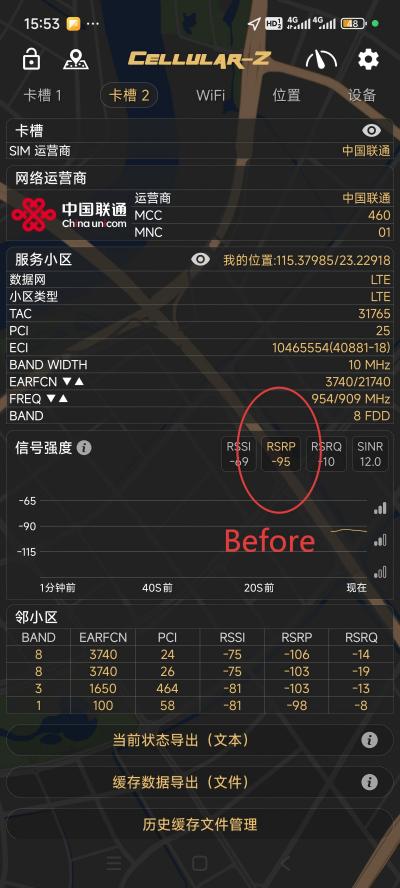
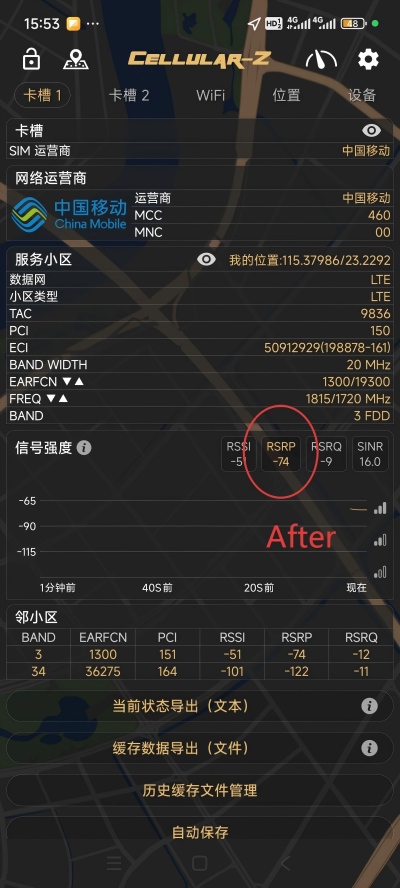
Comparison of Before and After Effects of Using a Mobile Network Signal Booster
Test the dBm before turning on the booster—stand in the spot where you usually have signal issues (like your basement or home office). Write that number down. Then turn on the booster, wait 2-3 minutes (it needs time to sync with the cell tower), and test the same spot again. If the dBm improved by 10-20 points (e.g., from -98 dBm to -82 dBm), your booster is working. I did this for a client last month—she thought her booster was broken because her bars didn’t change, but her dBm went from -102 to -85, and suddenly her calls stopped dropping. Bars lie; dBm tells the truth.
Second test: make a real call and test data speed. Numbers on a screen are great, but nothing beats real-world use. Grab a friend or family member and make a 5-10 minute call from your problem area. Before the booster, if you had static, dropped calls, or “hello? can you hear me?” moments, pay attention to how the call sounds now. Clear audio with no interruptions? That’s a win. For data, use a free app like Speedtest to check download/upload speeds before and after. You don’t need lightning-fast speed—even a jump from 0.5 Mbps (unusable for browsing) to 5 Mbps (enough to stream videos or send emails) means the booster is doing its job.

I had a small business owner in St. Petersburg who installed a booster for his checkout counter—before, customers couldn’t use mobile pay because data was too slow (0.3 Mbps). After testing, his speed jumped to 6 Mbps, and he stopped losing sales. Pro tip: Test at different times of day (morning, evening rush hour) because cell tower traffic can affect results. If the call quality and speed are consistent, your booster is working as it should.
Third test: check for oscillation (the booster’s “silent enemy”). Even if your dBm and call quality look good, oscillation can mean your booster is working inefficiently or even causing interference. Oscillation is what happens when the outdoor and indoor antennas are too close—think of it like feedback from a microphone too close to a speaker. How to spot it? Listen for static or crackling during calls, or watch for your signal bars fluctuating wildly (1 bar to 4 bars and back in 10 seconds). You can also check the booster’s LED lights—most quality models have an “oscillation” or “error” light that turns red if there’s a problem.

If you notice oscillation, don’t panic—it’s usually fixable. Just move the outdoor antenna further away from the indoor one (aim for at least 10 feet, or use a wall/ceiling to block the signal between them). I fixed this for a family in the suburbs last week—they’d mounted both antennas on the same wall, 6 feet apart. Moving the outdoor one to the roof solved the issue instantly. No tools, no tech skills—just a little repositioning.
So there you have it: three simple tests that take minutes and require nothing more than your phone. The key is to test “before and after” to see the difference—don’t just assume the booster isn’t working because your signal bars haven’t maxed out. Remember, even a small improvement in dBm or call quality means it’s doing its job.
Post time: Jan-20-2026